Build notes
What is under the Barham page
Seven pieces of work, each with the check that says it is actually
doing what it claims. Every number on this page came out of a script in
tools/, not off a spec sheet.
01 One file, ten upholsteries
The ten fabrics are not ten models and not ten textures swapped by hand. They
ride inside a single glTF as KHR_materials_variants, the extension
written for exactly this: one mesh, one download, the material changed on the
client. Picking a swatch costs no network request and no reload.
Fabric gets a second extension, KHR_materials_sheen, which is the
retroreflective lobe you see when light catches the ends of fibres. It is the
difference between velvet and painted plastic. The velvet runs a strong, broad
lobe; the linen a weak, tight one.
sofa.glb  3523 KB · 9312 tris upholstery, 256 tris legs · 10 variants

validator 2.0.0-dev.3.10 | ERRORS: 0
warnings 0 infos 0 hints 0
extensions used: [ 'KHR_materials_sheen', 'KHR_materials_variants', 'KHR_mesh_quantization' ]
drawCalls 2 verts 28704 tris 9568
Two warnings had to be fixed to get there. The mesh was shipping without a tangent basis, so every renderer would have invented its own and the normal maps would have looked different on iOS than on Chrome; that is now MikkTSpace tangents baked at build time. And the legs carried a UV set no material read, which is dead weight in the download.
The file is 3.5 MB for ten cloths because the textures are sized to the screen,
not to the source. One tile is 16 cm of fabric and the sofa is about 800 px wide
at the default framing, so a tile covers roughly 60 px; 512 px colour and 256 px
normals are still oversampled several times over at full zoom. The packed
occlusion-roughness map is read by two material slots and was being embedded
twice, which dedup fixed, and positions are stored as normalised
16-bit integers under KHR_mesh_quantization, which every viewer
here reads without a decoder. The same cloths at 1024 px, with the
duplicate, came to 11 MB.
02 Augmented reality, both platforms
Android reads the glTF directly through Scene Viewer, variants and all. iOS does
not: AR Quick Look wants USDZ, and while USD has variant sets, Quick Look gives
the viewer no way to switch them. So the build writes one USDZ per fabric and the
page repoints ios-src when a swatch is picked.
ok  sofa-ivory-linen.usdz    1808 KB  usd-validate: PASS
ok  sofa-sage-twill.usdz     1756 KB  usd-validate: PASS
ok  sofa-camel-boucle.usdz   2045 KB  usd-validate: PASS
ok  sofa-ink-velvet.usdz     1856 KB  usd-validate: PASS
ok  sofa-oatmeal-hopsack.usdz  1759 KB  usd-validate: PASS
ok  sofa-rust-herringbone.usdz 1802 KB  usd-validate: PASS
ok  sofa-charcoal-satin.usdz   1669 KB  usd-validate: PASS
ok  sofa-fig-mohair.usdz       1860 KB  usd-validate: PASS
ok  sofa-ecru-shearling.usdz   1926 KB  usd-validate: PASS
ok  sofa-taupe-alpaca.usdz     2139 KB  usd-validate: PASS

package members:
     845 KB  sofa_ivory-linen.usdc
     590 KB  0/ivory-linen_normal.png
     186 KB  0/ivory-linen_orm.jpg
     131 KB  0/ivory-linen_basecolor.jpg
up axis: Y | metersPerUnit: 1.0 | unresolved textures: 0
Two details that decide whether AR is useful or a toy. The stage is set to
metersPerUnit 1.0 and the model is built at true size, so the piece
lands in the room at 216 cm and not at whatever looks nice. And
ar-scale="fixed" takes away pinch-to-zoom, because the question a
shopper is really asking is whether it fits, and a sofa you can shrink cannot
answer that.
Not verified: nobody has pointed a real iPhone at these. The packages pass OpenUSD’s validators and resolve all their textures, which is as far as a Windows machine can take it. First run on a real handset is a half hour of somebody’s time and should happen before any of this is shown to a client.
03 Ten weaves, built rather than found
The fabrics are generated from a model of the interlacing itself. A cell grid records which yarn floats over which, the yarn’s crimp is read back off that grid along its own length, and the cross-section is a semi-ellipse. Plain weave, 2/2 twill, 2/2 hopsack, herringbone and 5-end satin all fall out of the same code with a different pattern. Bouclé is not an interlacing at all, so it gets looped slubs over a buried ground weave, the two piles, cotton velvet and mohair, have almost no relief with all of their character in the sheen, the shearling is nine thousand short wool curls laid over each other until no ground shows, and the alpaca shag is thirty thousand hairs drawn one at a time, each a curved stroke with a lighter tip, lying roughly one way.
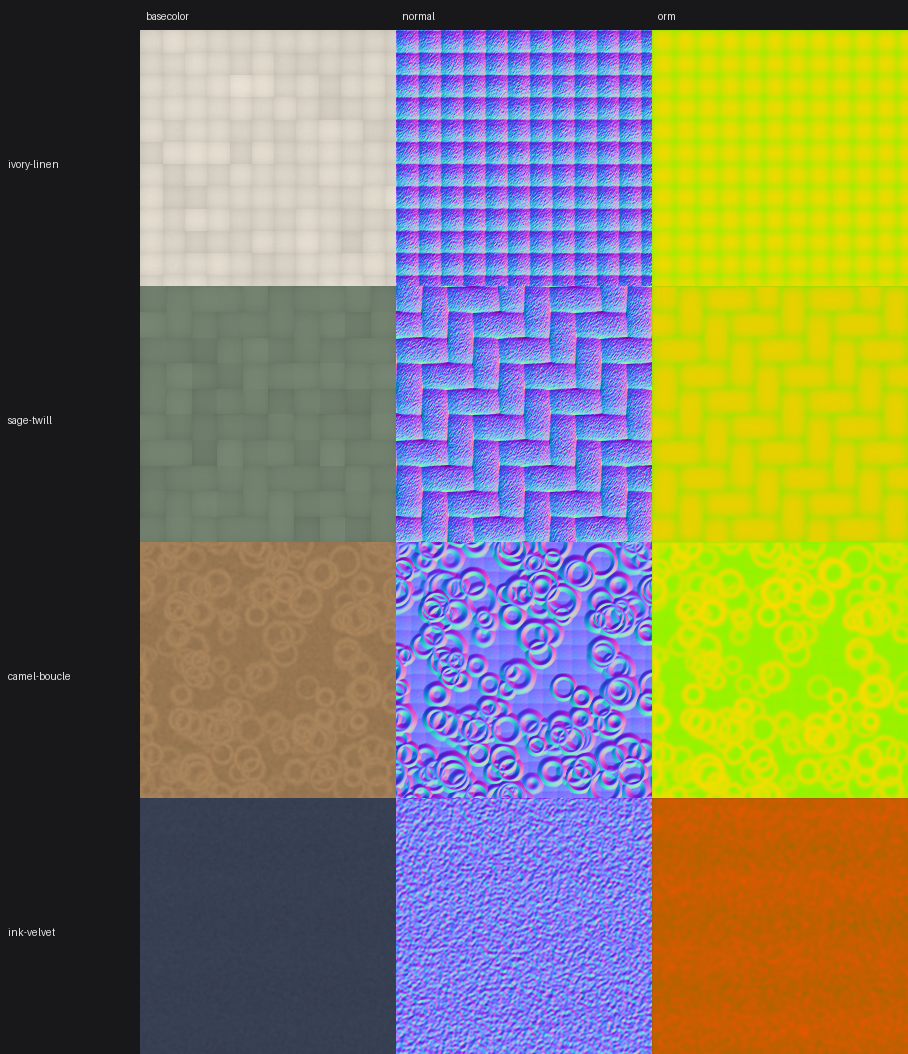
Maps are packed the way glTF expects: occlusion in red, roughness in green, metalness in blue, one texture instead of three. UVs are box-projected per triangle at a fixed texel density, so the weave is the same physical size on the arm as on the seat rather than stretching across the panels.
Two of the ten are piles with hair long enough that a flat texture is a lie: a normal map cannot put a hair on a silhouette or move one. So the stage draws the two piles as shell fur. The upholstery mesh is drawn again twenty to forty-eight times in one instanced call, each copy pushed further out along its normals, each copy showing only the pixels where a hair-density map is taller than that layer. Long fur needs its shells: the gap between layers is the length over the count, and once that gap is wider than a hair the pile reads as stacked plates. Each hair also leans its own way, in the surface's own plane and from the base rather than the tip, which is the difference between fur and a haircut. Gravity and a slow wind move the outer layers more than the inner ones, so the roots hold and the tips travel. A hand passing over the pile (the pointer on a desk, a finger in Brush mode on a phone) paints a flow map in the sofa's own footprint, and the shader lays the hair along the stroke and changes its nap: pile lying toward the eye shows its shadowed roots and goes dark, pile lying away shows its lit flanks and goes light, which is what a brushed alpaca does. The pile settles back over a couple of minutes.
Two things had to be fixed for the pile to survive being lengthened to 6 cm. The shells were stacking into visible contour lines wherever the surface was seen at a graze, so every hair now sits at its own height, taken from a hash of its lean: neighbouring texels never share a shell boundary and the bands have nothing to line up on. And the seat cushions were the only part whose normals were computed after their crown was sculpted, on a non-indexed geometry, which yields flat facet normals; invisible under a flat texture, but the fur displaces along those normals and turned every facet into a step. They are welded before the normals are averaged now.
That pass needed the vertex shader, which model-viewer does not expose, so the stage is now a small Three.js viewer of our own (the same glTF, the same variants and sheen, the same stage light) and model-viewer remains only for the AR hand-off. The two exposures were re-fitted to the old stage by measuring the mean luminance of the sofa in both renders: within 2 percent on the neutral card, 4 percent under the stage light.
04 Colour, measured
A textile client’s first question about a website is whether the colour on screen matches the cutting they post out. The honest answer is that a lit 3D view never matches a flat swatch, because the light is part of the picture. The useful answer is to measure the gap and then decide what to do about it.
This samples the rendered seat, averages the source swatch in linear light, converts both to Lab and reports CIEDE2000. Under about 1 the difference is invisible, 1 to 2 is visible side by side, over 3 is an argument with a client.
CIEDE2000 vs the flat swatch, by exposure (tone mapping: commerce)

fabric              0.55   0.70   0.85   1.00   1.05   1.20
ivory-linen          8.0    2.2    2.2    4.7    5.2    6.1
sage-twill           5.5    1.2    6.1   10.2   11.4   14.7
camel-boucle         8.9    2.7    3.0    7.0    8.2   11.5
ink-velvet          11.5   17.2   22.3   27.1   28.6   32.7
mean                 8.5    5.8    8.4   12.3   13.4   16.3

lowest mean dE at exposure 0.7 (5.85)
The velvet refuses to come along, and that is the finding worth keeping. Dark cloth diverges hardest in a lit view, because any light you add is proportionally enormous against a dark base. Dropping its sheen to zero only recovered about six points of the gap, so the material is not the problem, the lighting is. Which is the argument for the flat memo sample sitting under the viewer: colour is judged there, on a neutral 18% grey ground, and the 3D view is for form and scale.
Two smaller things. The tone mapping labelled commerce and the one
labelled neutral are the same mapper in model-viewer 4.3.1; the
internal table has no entry for either name, so both fall through to the Khronos
PBR Neutral operator. The measurements agree to the digit. And the swatch JPEGs
carry no ICC profile, which is what we want here: no profile means browsers read
them as sRGB, which is what they are.
05 WordPress
A plugin, running in real WordPress, offering the viewer as a block and as a
[holloway_viewer] shortcode. Both go through one render function, so
there is a single markup path rather than two that drift apart.
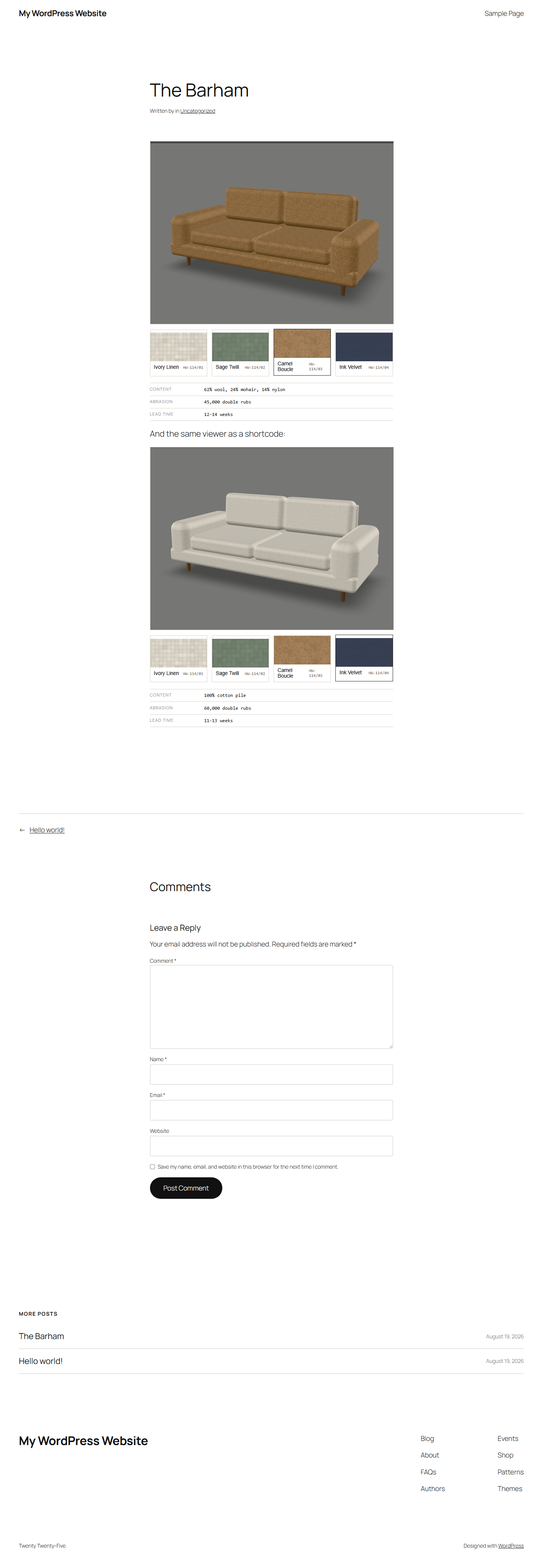
The parts a review would look for. Assets enqueue only on pages that actually
render a viewer, rather than site-wide. model-viewer is registered with
wp_register_script_module, because it ships as an ES module and a
classic script tag loads it into silence. Every attribute is escaped on output
and sanitised on input. Block metadata lives in block.json with an
editor.asset.php manifest beside the editor script, without which
the editor script loads with no dependencies and wp.blockEditor is
undefined by the time the block tries to register. The fabric range comes from a
filterable function, so a real site can point it at a custom post type without
touching the plugin.
Configuration rides on a data attribute rather than a global, which is why two viewers on one page keep their own state instead of fighting.
06 Squarespace
Squarespace does not take plugins, so this is code injection: one block of markup pasted into the footer that finds the product gallery, puts the viewer in front of it, and wires the swatches to Squarespace’s own variant select so the cart still takes the right SKU.
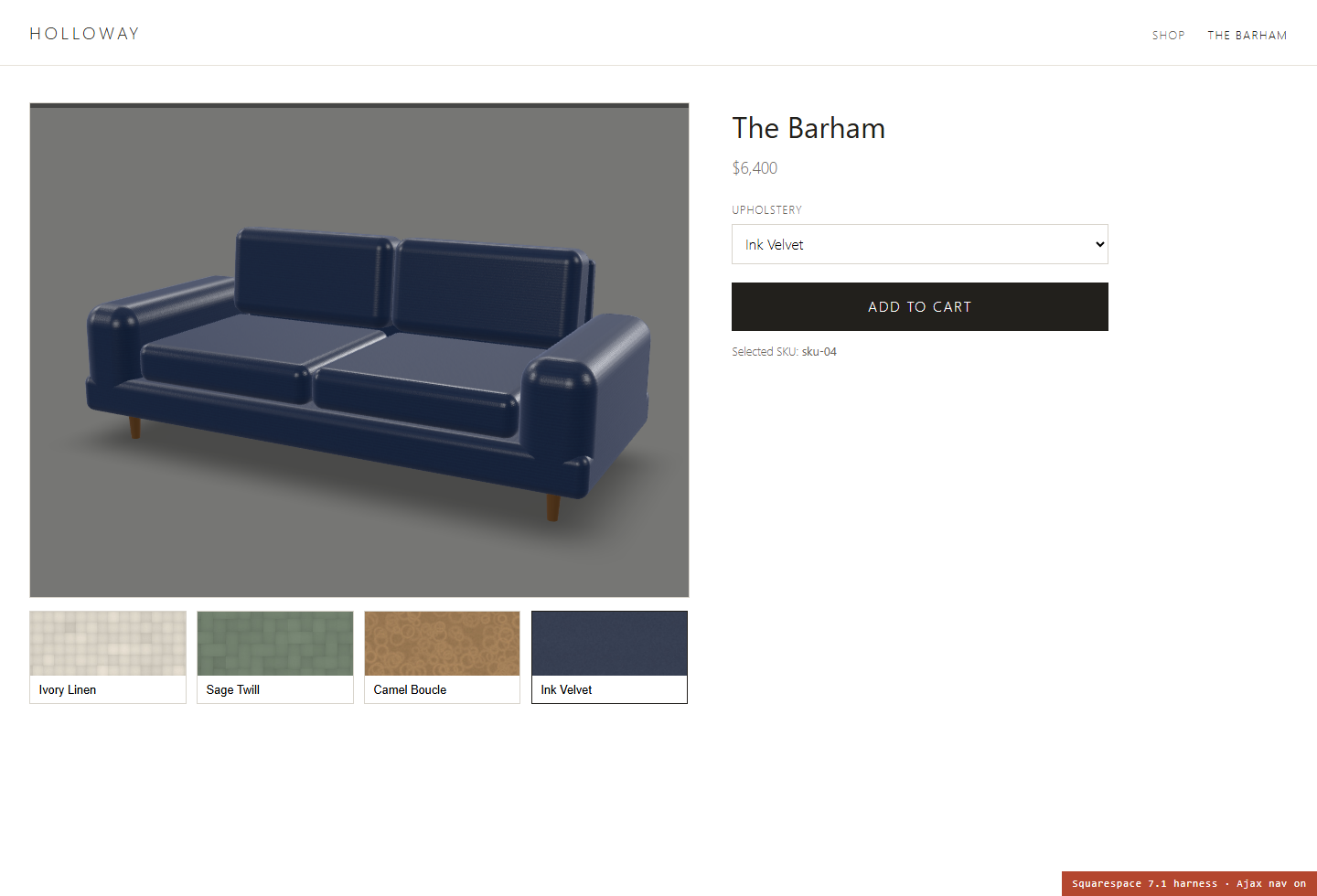
The thing that breaks injected code on Squarespace is that 7.1 navigates over
Ajax. Click an internal link and the body is swapped and mercury:load
is fired, with no page reload. A script that listens only for
DOMContentLoaded works on the first page a visitor lands on and never
again, which is why so much injected code "randomly stops working". The snippet
listens for both and refuses to mount a second viewer on re-entry.
Also worth knowing before quoting the job: Code Injection needs a Business plan,
Squarespace’s file uploader rejects .glb and .usdz so the
models have to live on a CDN, and appending
?format=json-pretty to any Squarespace URL dumps the page’s product
JSON, which is the fastest way to get the exact variant strings the snippet has to
match.
Not verified: this has not run on a live Squarespace account. The harness reproduces the 7.1 product DOM and its Ajax lifecycle, which is where injected code actually fails, but it cannot catch template-specific CSS collisions. Budget an hour on the real site.
07 AI product photography, and its limit
The room is generated locally with SDXL Turbo. The sofa is not, and never should be: ask a diffusion model for a sofa and it invents one, with the wrong arm, the wrong leg, and a fabric the mill does not sell. The room is set dressing. The piece is the product, and it comes off the same glTF the shopper configures.
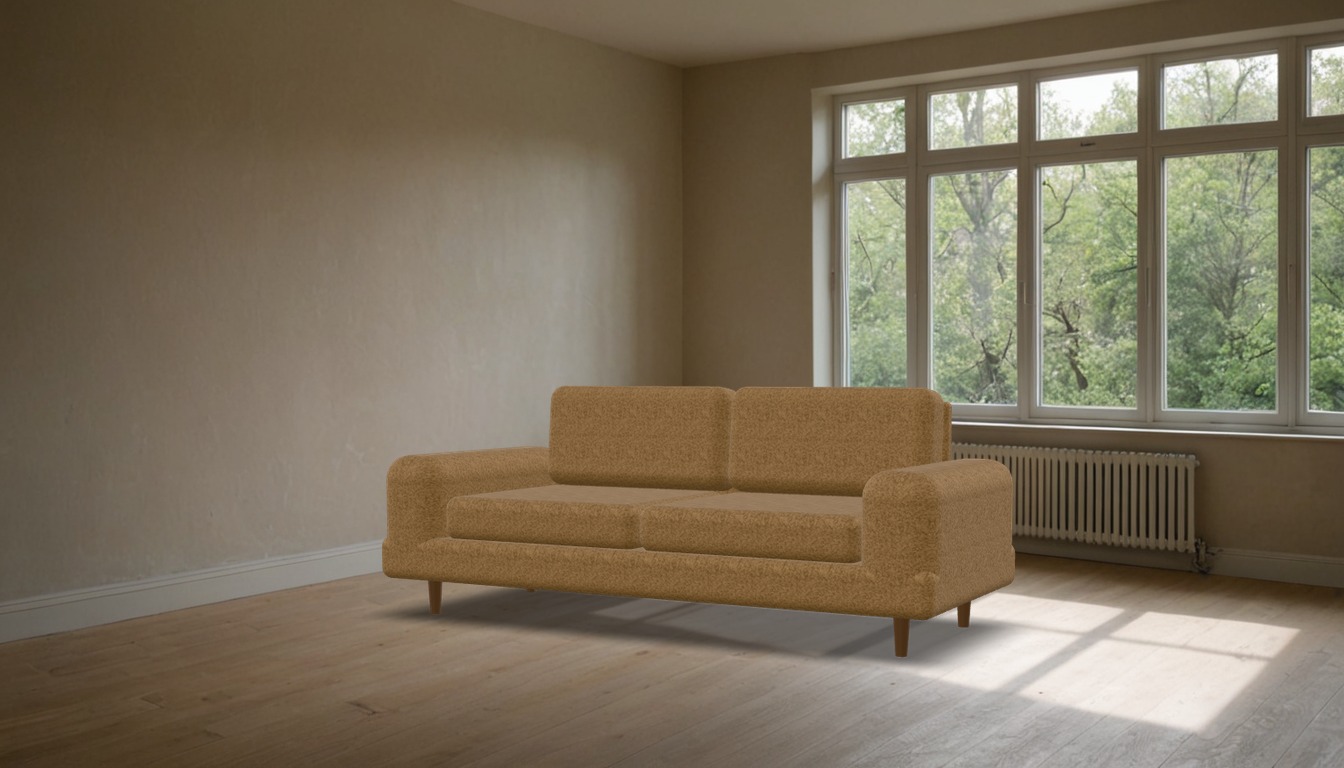
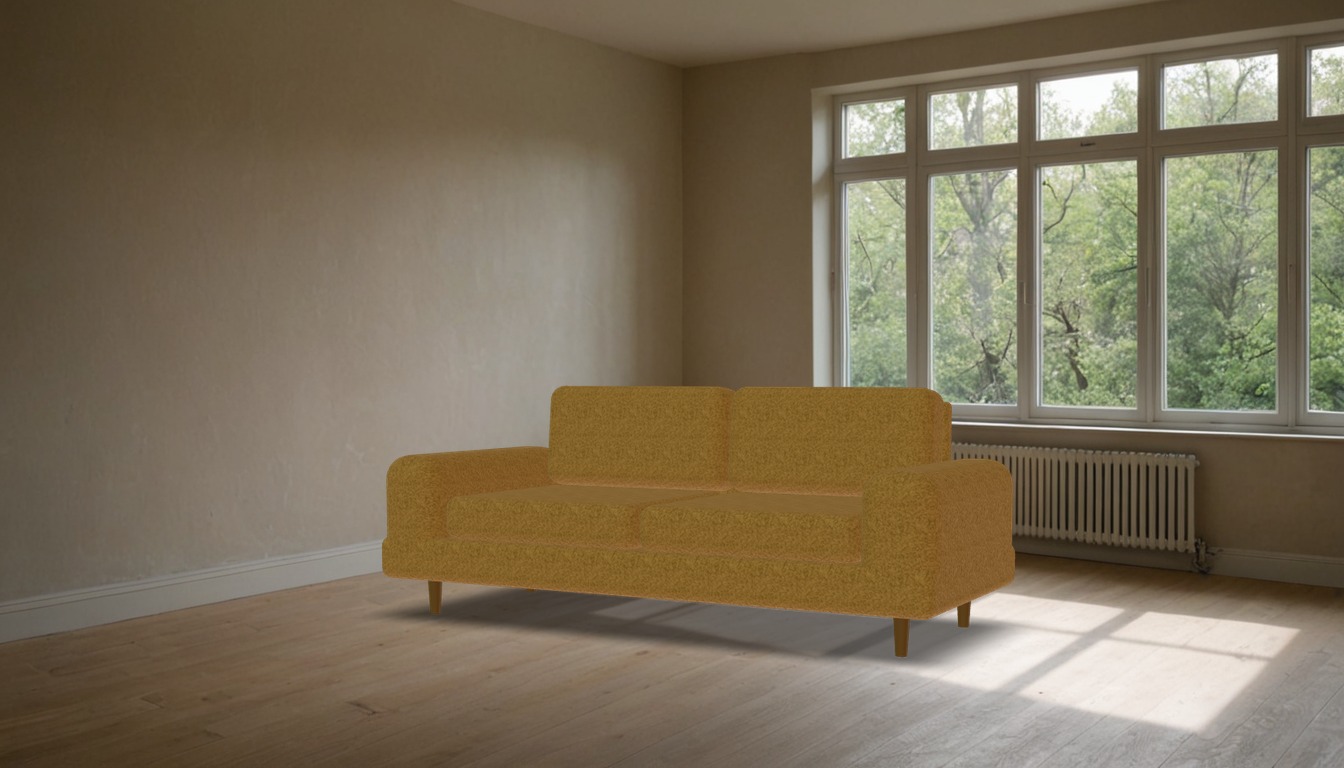
That second image is the experiment failing usefully. A photograph is not a light probe: most of its area is dark wall and floor, so total irradiance collapses and the piece renders muddy. An auto-exposure loop matching the plate’s mean luminance to the studio version fixed the brightness in five passes, but nothing fixes the colour, because the room’s warm plaster dominates the integral and tints the cloth.
So the studio plate ships, and the honest conclusion is that a real in-situ photograph is a different job: an HDRI of the actual room, a shadow catcher, and a render, not a JPEG used as a probe. Worth knowing before promising it.
08 What is checked, automatically
Eighteen assertions across the three integrations, driven through a real browser rather than asserted against a DOM snapshot. They test the things that go wrong quietly: whether a swatch really reached the renderer or only restyled itself, whether the URL is shareable, whether two viewers on one page stay independent, whether the Squarespace snippet survives an Ajax swap.
  PASS  storefront: ten variants in the glTF  Ivory Linen, Sage Twill, Camel Boucle, Ink Velvet, Oatmeal Hopsack, Rust Herringbone, Charcoal Satin, Fig Mohair, Ecru Shearling, Taupe Alpaca
  PASS  storefront: swatch switches the glTF variant  Ink Velvet
  PASS  storefront: ios-src follows the fabric  sofa-ink-velvet.usdz
  PASS  storefront: specification re-tickets  100% cotton pile
  PASS  storefront: url is shareable  ?f=ink-velvet
  PASS  storefront: arrow keys move through the rail  Oatmeal Hopsack
  PASS  storefront: canvas renders something  497 KB data URL
  PASS  squarespace: no viewer on a non-product page
  PASS  squarespace: mounts after an Ajax page swap
  PASS  squarespace: swatch drives the glTF variant  Ink Velvet
  PASS  squarespace: cart SKU stays in step  sku-04
  PASS  squarespace: native gallery hidden only after mount
  PASS  squarespace: exactly one viewer after re-entry  1 stage(s), 2 mount call(s)
  PASS  wordpress: block and shortcode both render
  PASS  wordpress: each instance keeps its own fabric  Sage Twill / Ink Velvet
  PASS  wordpress: spec rows filled from PHP data
  PASS  wordpress: stage holds a 4:3 box  647 x 486
  PASS  wordpress: instances do not share state  Camel Boucle / Ink Velvet

18/18 checks passed
09 What this does not prove
- AR has not been run on a physical iPhone or Android handset. The packages validate and resolve; the handoff itself is untested.
- The Squarespace snippet has not run on a live Squarespace account, only against a harness built to match 7.1's DOM and Ajax behaviour.
- Colour numbers come from a browser pinned to sRGB, not from a colorimeter on a calibrated display. They are good for comparing settings against each other, which is what they were used for, and are not a substitute for a physical proof against the actual cloth.
- The sofa is a demonstration model built in code, not a scanned or CAD-accurate piece of furniture. Proportions are right, the joinery is not modelled.
- The plugin has not been through WordPress.org review, PHPCS, or a security audit beyond escaping every output and sanitising every input.
- The fur lives in the stage only. Scene Viewer and Quick Look render standard glTF and USDZ, so the piece placed in your room wears the flat hair texture, not the moving pile.